
WhatsApp Business AI in India: How Small Businesses Can Use It (2026 Guide)
- Home
- WhatsApp Business AI in India: How Small Businesses Can Use It (2026 Guide)
Published: October 31, 2026
Last Updated: October 31, 2026
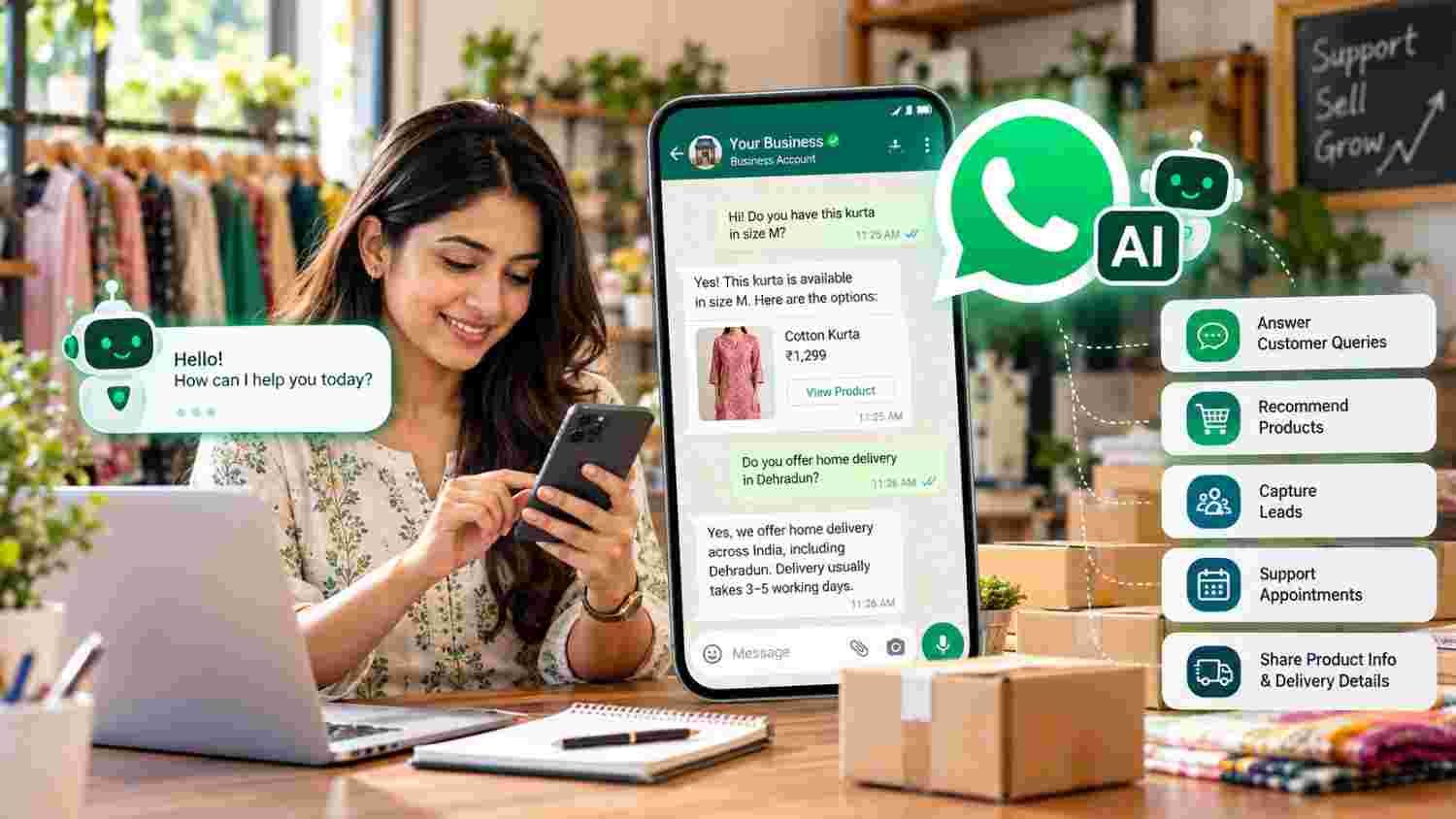
WhatsApp Business AI helps eligible businesses handle customer conversations with an AI-powered assistant inside WhatsApp. It can answer common questions, share product information, recommend suitable products, collect customer enquiries, and support appointment bookings.
For Indian small businesses, this can make customer communication easier, especially when enquiries arrive outside business hours or during busy periods. However, access is subject to Meta's eligibility and rollout conditions. Businesses should also check the AI's answers, prepare accurate business information, and keep a human available for complex customer requests.
WhatsApp Business AI is an AI-powered customer communication feature announced by Meta for eligible small and medium-sized businesses in India. It uses information about a business to help respond to customer questions and support sales conversations. Meta's current WhatsApp Business product information also describes its customer-facing AI agent as Meta Business Agent.
The feature can support repetitive customer interactions, but it does not replace human judgement, sales support, or careful management of customer information.
WhatsApp Business AI can help eligible businesses respond to common customer queries.
Supported use cases include product recommendations, lead collection, appointment bookings, and customer support.
Businesses can provide information about their products, services, catalogue, and policies.
Setup is available through the WhatsApp Business app for eligible accounts.
Availability, feature names, and language support can vary by rollout.
Human review remains important for sensitive questions, complaints, and unusual requests.
This guide is designed for small-business owners, retailers, online sellers, local service providers, marketing managers, and customer support teams in India. It is useful when a business receives repeated WhatsApp enquiries, struggles to respond outside working hours, wants to share product information faster, or needs a more organised way to handle incoming leads. It can be especially relevant to clothing stores, restaurants, salons, coaching institutes, home businesses, and appointment-based service providers.
Meta announced Business AI on WhatsApp for small businesses in India in May 2026. The announcement described an AI feature built into the WhatsApp Business app that allows eligible businesses to assist customers without requiring coding or separate third-party tools.
The AI can use information supplied by the business to answer common questions. Depending on the available setup, this may include business profile information, products, services, prices, discounts, shipping details, and catalogue content.
There is also an important naming distinction. Meta's India announcement used the name Business AI on WhatsApp, whereas its current WhatsApp for Business product page describes Meta Business Agent. The exact label and controls visible in an account may depend on the rollout and version.
Do not confuse this customer-facing agent with the separate Meta AI business assistant, which helps business owners with tasks such as writing product descriptions and creating catalogue content.
For the official background, read Meta's announcement of Business AI for small businesses in India.
The feature is intended to support everyday customer conversations. Its practical uses depend on eligibility, available controls, and the information supplied by the business.
For example, a clothing store may receive repeated questions about sizes, colours, availability, and delivery. A properly configured AI agent can help answer routine questions using the business's available product information.
Similarly, a coaching institute may use it to respond to enquiries about courses, class timings, admission processes, and contact details. The business should still verify important information and handle admission decisions itself.
Eligible businesses can begin setup through the WhatsApp Business app. Meta's original India announcement refers to the Your Business AI option under Tools, while its current product guidance uses the name Meta Business Agent.
Follow these steps, using the label currently displayed in your account.
Before enabling the feature, review your business profile. Make sure your business name, description, contact information, address, business hours, and website details are accurate.
An AI agent can only provide useful information when the underlying business details are clear and up to date.
Open the WhatsApp Business app and navigate to the Tools tab.
For eligible accounts, look for an option such as Your Business AI, AI Agent, or Meta Business Agent. The wording may vary depending on the current rollout.
Select the available AI feature and follow the on-screen instructions. Depending on your account, you may be asked to authenticate or link an account before continuing.
Review the permissions and settings rather than accepting options without understanding them.
Provide the business information supported by your setup. This may include your website, product catalogue, price lists, product descriptions, service details, and frequently asked questions.
Also prepare clear information about delivery, returns, appointment rules, business hours, and other common customer questions.
Avoid adding outdated or contradictory details. For instance, two different prices for the same product may lead to confusing customer responses.
Where the settings are available, review the agent's response instructions, audience, and the situations in which it should reply.
Keep responses aligned with your business's actual services and communication style. Also identify topics that should be handled by a staff member, such as complaints, refunds, unusual requests, or sensitive discussions.
Test the AI as though you were a customer. Ask about product availability, prices, delivery, appointment timings, and other common questions.
Check whether answers are accurate and whether the AI knows when to hand a conversation to a person. Make corrections where the available settings allow them, then activate the feature according to the in-app instructions.
For more information, consult the official WhatsApp Business Agent setup guide.
Not seeing the feature does not automatically mean your app is faulty.
Meta's product information states that its Business Agent is available to eligible businesses in select markets, with additional markets being introduced over time. Its Help Center also explains that some businesses may not yet have access and that language support can vary.
Try the following checks:
Make sure you are using the WhatsApp Business app rather than relying on the regular WhatsApp Messenger app.
Check the Tools section for the current AI-related option.
Review Meta's official product page for availability information.
Check whether a waitlist option is offered to your account.
Follow the in-app guidance rather than installing an unofficial AI application.
Meta does not publish a universal guarantee that every Indian business account will receive access by a particular date. Therefore, avoid treating an unavailable option as a technical error without checking eligibility.
You can also review the WhatsApp Help Center instructions for Meta Business Agent availability.
Different businesses can use the feature for different customer communication needs.
Retail and clothing stores: Answer common questions about product details, available options, and delivery information.
Restaurants and cafes: Respond to enquiries about menus, opening hours, location, and reservation-related information. Confirm actual bookings through the appropriate process.
Coaching institutes: Share course information, general admission details, class timings, and enquiry contact information.
Salons and appointment-based services: Handle routine questions about services, working hours, and appointment enquiries.
Online sellers: Provide product information, recommend suitable catalogue items, and collect customer questions.
The most useful applications usually involve repetitive questions with clear, verified answers. Complex decisions should remain under human supervision.
Businesses should understand the difference between the AI agent and the app's existing communication tools.
These capabilities are not identical, and the exact options depend on the account and feature rollout. Businesses can continue using standard WhatsApp Business tools even when the AI feature is unavailable.
AI responses can be inaccurate, incomplete, or unsuitable for an unusual customer request. Therefore, never allow automated answers to make unverified promises about prices, refunds, delivery dates, product availability, or service guarantees.
Businesses should also review how customer information is handled. WhatsApp explains that business messaging can have different privacy arrangements from personal chats; some business conversations handled using Meta's hosting services are not considered end-to-end encrypted.
Before using an AI feature, review the WhatsApp privacy information for business conversations. Do not provide unnecessary sensitive customer information, restrict access to business accounts, and follow applicable privacy and data-protection requirements.
The availability of UPI payments inside AI-assisted chats should also be checked separately. Meta described this capability as forthcoming in its initial India announcement, so businesses should not assume it is enabled in every account.
Enabling an AI feature is not the same as achieving business growth. Review real customer outcomes to understand whether it is useful.
Track indicators such as:
Number of customer enquiries received.
Time taken to respond to routine questions.
Number of enquiries that become qualified leads.
Appointment enquiries and confirmed bookings.
Product enquiries that progress to purchases.
Conversations transferred to a human team member.
Customer complaints or corrections involving AI-generated answers.
For example, a business may notice that routine product questions are handled more quickly, but sales do not increase. That may indicate that product information is being shared effectively while pricing, product suitability, or the purchase process needs attention.
Use these observations to improve business information and customer support. Do not assume that faster automated replies automatically mean more sales.
AI-assisted customer communication works best when it is part of a clear digital marketing strategy. Businesses also need relevant website content, product information, social media activity, advertising, and an organised process for handling enquiries.
Tulyarth DigiWeb offers digital marketing services that include SEO, social media marketing, and paid advertising. Explore its digital marketing services in Dehradun to understand its service offering.
You can also learn about Tulyarth DigiWeb before evaluating the right digital strategy for your business.
When you are ready to discuss your business objectives, contact Tulyarth DigiWeb about your digital marketing requirements.
WhatsApp Business AI in India offers eligible small businesses another way to manage routine customer conversations, share product information, and support lead generation. It can be useful for retailers, online sellers, service providers, and appointment-based businesses that receive repeated enquiries.
However, successful use depends on accurate business information, suitable configuration, human supervision, and responsible customer-data practices. Before activating the feature, check eligibility, test its responses, and decide which conversations require personal attention.
Used thoughtfully, WhatsApp Business AI can support a more organised customer communication process while allowing business owners to focus on the decisions and relationships that need a human touch.
You may also find these articles helpful: