
Google Business Profile Optimization: How to Get More Local Calls & Enquiries (2026)
- Home
- Google Business Profile Optimization: How to Get More Local Calls & Enquiries (2026)

Published: November 5, 2026
Last Updated: November 5, 2026
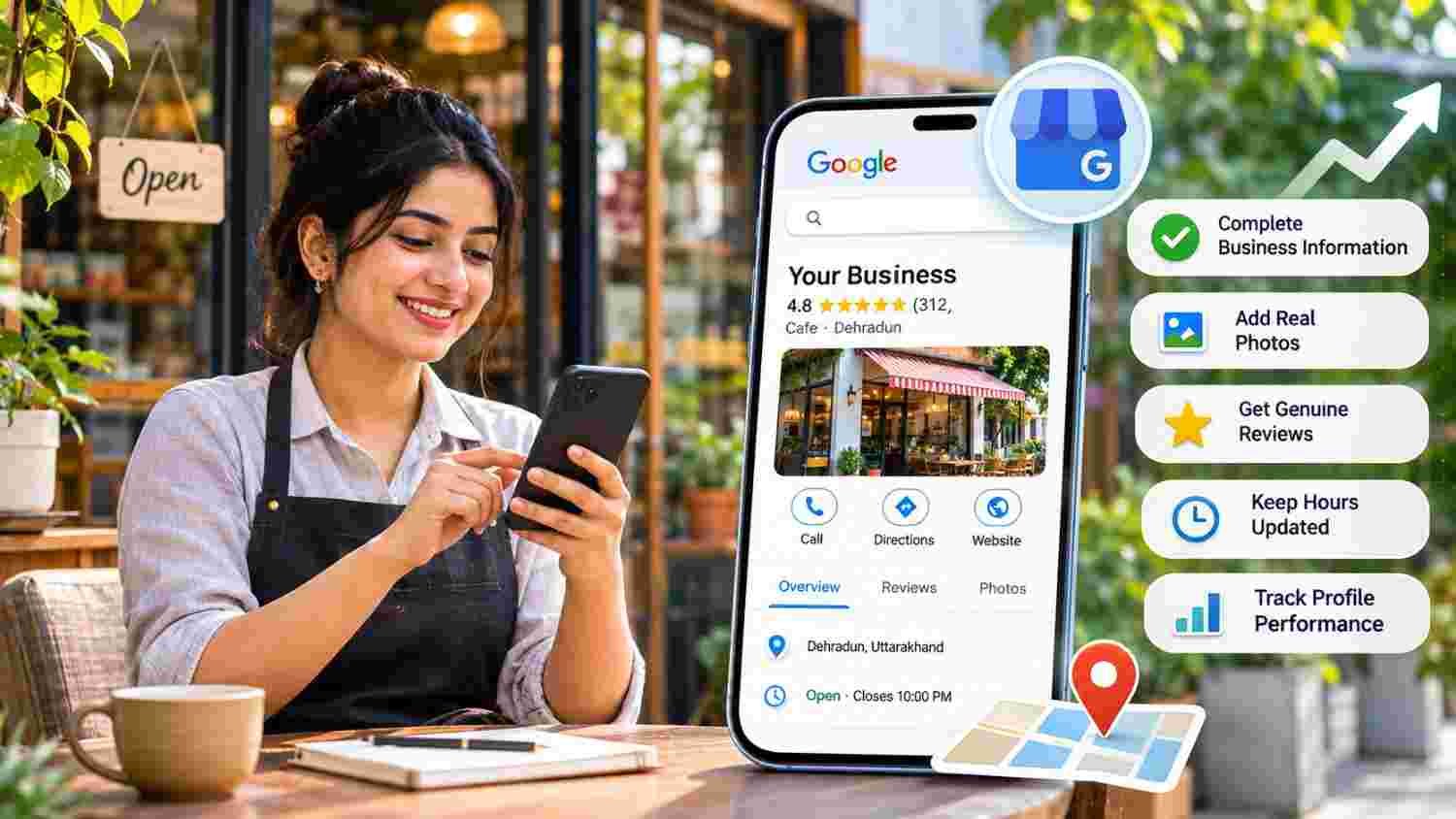
Google Business Profile Optimization is the process of improving a business's information, categories, photos, services, reviews, and overall profile quality so nearby customers can discover and understand the business through Google Search and Google Maps.
For businesses in India, an accurate and well-maintained profile can make it easier for potential customers to find contact details, check opening hours, explore services, and make enquiries. However, appearing in local results also depends on factors such as relevance, distance, and prominence. No optimization technique guarantees a particular Google Maps ranking.
Google Business Profile Optimization helps businesses maintain accurate information and improve how their profiles serve potential customers. The process includes choosing relevant categories, verifying the business, updating contact details, adding genuine photographs, responding to customer reviews, and maintaining consistent business information online.
Google's local results are mainly influenced by relevance, distance, and prominence. Therefore, businesses should focus on providing useful information, building genuine customer trust, and maintaining an accurate online presence rather than relying on keyword stuffing or ranking tricks.
A complete and verified Google Business Profile helps customers discover important business information.
Accurate business names, categories, locations, phone numbers, and opening hours are essential.
Genuine customer reviews and helpful responses can build customer confidence.
Real photographs help customers understand what a business offers.
Local rankings depend on relevance, distance, and prominence.
Fake reviews, misleading business details, and keyword-stuffed names can create policy problems.
Regularly review profile performance, calls, website clicks, and customer enquiries.
This guide is designed for small-business owners, retailers, restaurants, clinics, coaching institutes, salons, professional service providers, and digital marketing managers in India.
It is particularly useful for businesses that depend on nearby customers, receive local enquiries, operate physical locations, or travel to customers within a defined service area. For example, a restaurant in Dehradun may want customers to find its location and opening hours, while a home service provider may want people in its service area to discover its services and contact details.
Google Business Profile is a free tool that allows eligible businesses to manage how their information appears across Google Search and Google Maps.
A business can provide details such as its name, address or service area, phone number, website, opening hours, business category, photographs, and other relevant information.
For example, when someone searches for a nearby bakery, Google may display relevant local businesses with their locations, reviews, operating hours, and contact information.
Similarly, someone searching for a digital marketing company in Dehradun may find local business profiles that help them compare available services and contact a suitable provider.
A Business Profile is therefore more than an online listing. It provides important information that can influence whether a potential customer decides to visit, call, or explore a business further.
Before improving a profile, it is important to understand how Google approaches local search results.
According to Google's official guide to local ranking factors, local results are primarily based on three factors.
These factors work together. For instance, a business may offer exactly what someone searches for, but another suitable business could be closer to that customer.
Therefore, there is no single setting that guarantees the top position in Google Maps. Optimization should focus on relevance, accurate information, and genuine reputation.
The following steps can help businesses maintain a useful and trustworthy profile.
First, check whether your business already has a Google Business Profile.
If it exists, claim and manage the correct listing. Otherwise, create a profile through Google's official Business Profile process.
Verification helps Google confirm that you are authorized to represent the business. Follow the verification method offered to your account.
Also, remember that eligibility matters. A business generally needs a physical location customers can visit or must travel to customers to qualify. An online-only business without in-person customer contact generally cannot create an eligible profile.
Your business name should match the name customers recognize in the real world.
For example, if your registered storefront and branding use "ABC Dental Clinic," do not change the profile name to "ABC Dental Clinic Best Dentist in Dehradun" simply to include extra keywords.
Google's guidelines do not allow unnecessary service, location, or promotional information in business names. Such additions may lead to profile restrictions or suspension.
Instead, use the correct business name and provide relevant service and location details in their appropriate profile fields.
Your primary category tells Google what your business mainly does.
Therefore, choose a category that accurately describes your core business instead of selecting one just because it contains a desirable keyword.
For example:
A restaurant should select an appropriate restaurant category.
A dental practice should choose the relevant dental category.
A digital marketing agency should choose the most accurate available marketing-related category.
You may add additional relevant categories when they genuinely describe your business. However, avoid selecting unrelated categories simply to appear in more searches.
Google recommends choosing the fewest categories needed to describe your overall core business.
Your profile should help customers contact or visit your business without confusion.
Check the following details:
Complete and accurate business address, where customers visit your premises.
Correct telephone number.
Official business website.
Accurate map pin.
Actual service areas, where applicable.
If your business travels to customers and does not receive customers at its business address, remove that address from your Business Profile and specify the service areas you actually cover. If your business also receives customers at a staffed storefront, you may display that eligible business address and add your service areas where applicable. Do not use a virtual office or misleading address to create a Business Profile.
Also, avoid creating multiple profiles for the same business location. Review Google's official Business Profile representation guidelines before making major changes.
Incorrect operating hours can create a frustrating customer experience.
Imagine someone travelling to a shop after checking Google, only to discover that it is closed. This can reduce customer confidence.
Add your actual regular business hours and update special hours for festivals, holidays, or temporary changes.
For example, a restaurant in Dehradun may have different opening hours during a festival. Updating those details helps customers plan their visit more accurately.
You can manage these details through Google's Business Profile hours management instructions.
Your business description should explain what you offer, whom you serve, and what makes your business useful.
Include relevant information about your products, services, experience, and business background.
For example, a coaching institute can explain its courses, learning approach, and student support. A local service company can describe the services it provides and the areas it genuinely serves.
Avoid keyword stuffing, exaggerated claims, unnecessary promotional language, and links in the description field. Google's profile guidelines require clear, relevant, and honest business information.
Photographs help potential customers understand what a business actually looks like and what it offers.
Depending on your business type, consider adding:
Storefront and entrance photographs.
Interior photographs.
Product photographs.
Team and workplace photographs.
Service-related photographs.
Videos showing genuine business activities.
A restaurant, for example, can upload photographs of its dining area and menu items. Meanwhile, a salon can show its actual interiors and service environment.
Google recommends well-lit, focused photographs that accurately represent the business. Its photo guidance recommends a resolution of 720 × 720 pixels, with a minimum of 250 × 250 pixels.
Read the official Google Business Profile photo and video requirements.
Customer reviews help potential customers understand other people's experiences with a business.
After completing a service or purchase, politely invite customers to share honest feedback through your Google review link or QR code. Ask without pressuring customers or influencing what they write.
Never buy reviews or offer payment, discounts, free products, or services in exchange for any review, revision, or removal. Do not selectively request positive reviews from satisfied customers or discourage negative feedback.
Respond to positive and negative reviews professionally. Acknowledge useful feedback, address genuine concerns, and avoid sharing private customer information publicly.
Where available for your business category, use relevant profile sections to explain what you offer.
For instance, a salon may list haircuts, styling, and other available services. A retail business may be able to showcase eligible products.
However, do not add services that the business does not actually provide.
Additionally, review your information periodically. Whenever contact numbers, opening hours, product details, or service information change, update the profile accordingly.
Optimization should not stop after completing the profile.
Review available Business Profile performance data to understand how customers discover and interact with your business.
Depending on your profile and available reporting, useful measurements may include:
Customer searches and profile views.
Website clicks.
Phone calls.
Direction requests.
Other available customer interactions.
For example, if people view your profile but rarely visit your website, review the website link, service information, and customer journey.
Likewise, if direction requests increase but actual visits remain low, investigate opening hours, map accuracy, and customer feedback.
Use these observations to identify improvements rather than judging performance from one metric alone.
Even a verified profile can become less useful when its information is inaccurate or misleading.
Avoid these common mistakes:
Adding keywords and locations unnecessarily to the business name.
Choosing unrelated business categories.
Creating duplicate profiles for the same location.
Using an inaccurate address or misleading service area.
Buying customer reviews or offering incentives.
Ignoring negative reviews and genuine customer complaints.
Uploading photographs that do not represent the actual business.
Leaving old opening hours or phone numbers unchanged.
Expecting immediate top rankings after making profile edits.
Instead, maintain accurate information and follow Google's guidelines consistently. These practices help protect the profile while giving customers more dependable information.
A Google Business Profile is an important part of local visibility, but local SEO involves more than maintaining one listing.
Your website should also provide useful information about your products, services, business location, and service areas.
For example, a company serving Dehradun can create a relevant service page explaining what it offers to customers in that area. Its contact information should also be accurate and consistent with its other business details.
Furthermore, useful local content, relevant website references, genuine customer feedback, and a smooth mobile experience can support a stronger overall online presence.
For businesses that have eligible local storefronts or service locations, LocalBusiness structured data may also help search engines understand information about the business. However, adding schema does not guarantee better Google Maps rankings.
The aim is to create a consistent experience across your website, Business Profile, and other trustworthy online references.
A strong local digital presence requires accurate business information, relevant website content, search optimization, and a clear strategy for generating customer enquiries.
Tulyarth DigiWeb provides SEO, social media marketing, Google Ads, Meta Ads, and other digital marketing services to help businesses strengthen their online presence.
Businesses can explore its digital marketing services in Dehradun to understand how different digital channels can support their visibility and growth objectives.
You can also learn about Tulyarth DigiWeb before evaluating the right digital marketing approach for your business.
When you are ready to discuss your business goals, contact Tulyarth DigiWeb about your digital marketing requirements.
Google Business Profile Optimization helps local businesses provide accurate information, build customer confidence, and improve their chances of appearing for relevant local searches.
By verifying your profile, choosing accurate categories, updating business details, adding genuine photographs, responding to reviews, and monitoring performance, you can build a more useful online presence.
However, local visibility depends on more than profile settings—relevance, distance, prominence, website quality, and genuine business reputation all matter.
Focus on helping nearby customers find the right information and take the next step. Consistent improvements are more sustainable than shortcuts that promise instant Google Maps rankings.
You may also find these articles helpful:
WhatsApp Business AI in India: How Small Businesses Can Use It (2026 Guide)
Google Ads Quality Score: What It Means and How to Improve It (2026)
Google Ads Conversion Tracking: How to Track Leads, Calls and Sales
Google Ads vs Meta Ads: Which Is Better for Lead Generation in India?
How to Choose Loan Management Software for Microfinance Institutions