
Internal Linking Strategy: How to Connect Your Website Pages for Better SEO
- Home
- Internal Linking Strategy: How to Connect Your Website Pages for Better SEO

Published: September 21, 2026
Last Updated: September 21, 2026
Internal Linking Strategy is the planned process of connecting relevant pages on the same website with useful, descriptive links. A strong strategy helps visitors discover related information while also helping search engines find pages, understand relationships between content, and identify important pages on a site.
Internal links can connect blog posts, service pages, product pages, category pages, and other important resources. However, adding links randomly is not a strategy. Each link should have a clear purpose and provide useful context.
An internal linking strategy organizes links between pages on the same website so users and search engines can move through related content logically. The strategy typically includes linking important pages from relevant content, using descriptive anchor text, connecting topic-related pages, fixing orphan pages, and regularly auditing broken or weak internal links.
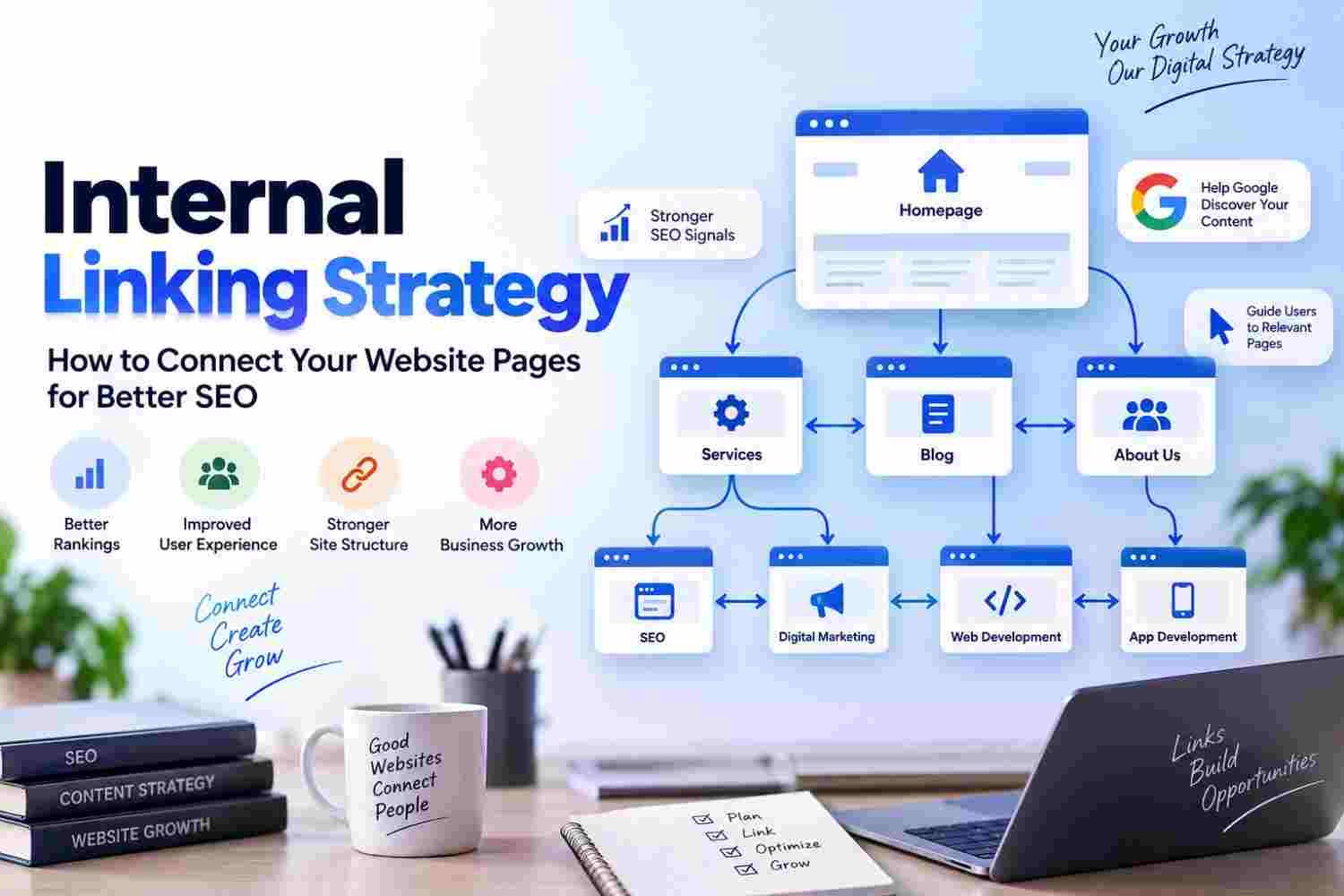
A simple structure looks like:
Homepage → Main Service → Supporting Content → Related Content
For example, a digital marketing website may connect a broad service page with relevant articles about SEO, social media marketing, content strategy, and landing pages.
Google recommends crawlable links and descriptive anchor text because they help people and Google understand the destination page.
Internal links connect one page of your website to another.
Good links help users discover relevant content.
Search engines can use internal links to discover and understand pages.
Use descriptive, natural anchor text.
Link your important service and business pages from relevant content.
Build connections between closely related articles.
Fix orphan pages that have no useful internal links.
Avoid adding links only for keyword density.
Audit internal links regularly.
Use Search Console and SEO tools to find opportunities.
Internal linking means creating a hyperlink from one page on your website to another page on the same website.
For example, an article about website speed might naturally link to another article about technical SEO. A blog about API integration might link to a relevant web application development service.
Internal links can be:
Contextual links inside content
Navigation links
Breadcrumb links
Footer links
Related-content links
However, contextual links are especially useful when they naturally connect one topic to another. Google also recommends using relevant anchor text so users can understand the destination before clicking.
Internal linking supports both website usability and search visibility.
Google explains that links can help it discover new pages and understand their relevance. It also recommends ensuring that important pages can be reached through crawlable links.
A well-planned internal linking structure can help you:
Connect related topics
Improve navigation
Make important pages easier to discover
Strengthen the relationship between related content
Support crawling and indexing
Guide users toward useful next steps
Ahrefs also highlights internal links as an important way to connect content, distribute internal authority, and guide users and search engines through a website.
Think about your website as a network.
Each page is a destination. Internal links act like roads connecting those destinations.
For example:
SEO Service Page
↓
SEO Tools Guide
↓
Internal Linking Guide
↓
Technical SEO Guide
These connections give additional context about how the pages relate to one another.
Google's developer guidance recommends ensuring that important pages are reachable through crawlable links and that the link text is relevant to the target page.
Homepage
→ Services
→ Service Pages
→ Supporting Blog Content
This creates clearer topical relationships.
The best internal links usually appear where they genuinely help the reader.
“What additional information would help the reader here?”
That is more useful than inserting a link simply because you want to pass authority to another page.
Avoid generic anchors such as:
Click Here
Read More
Learn More
This Article
Here
Instead, describe the destination naturally.
Poor:
Read our article [here].
Better:
Read our guide to API Integration in Web Development.
Your internal linking strategy should not only connect blog posts.
It should also support your important commercial pages.
For Tulyarth DigiWeb, useful destinations can include relevant pages for:
Web development
Digital marketing
Mobile app development
Web applications
Ecommerce development
The exact page should depend on the topic being discussed.
A blog about ecommerce should not randomly link to a mobile app page unless there is a genuine connection.
Your blog archive can become much stronger when related articles support one another.
For example:
Website Speed Guide
↕
SEO Mistakes Guide
↕
Internal Linking Strategy
↕
SEO Timeline Guide
This creates a connected information network instead of isolated posts.
Ahrefs recommends adding contextual links to relevant pages and using related-content sections to surface useful material.
Don't only link from new posts to old posts.
Go back to relevant older articles and add links to useful newer content.
This creates a two-way content network.
For example, after publishing this article, a relevant older SEO article could naturally mention internal linking and link back here.
Ahrefs' internal-link opportunity guidance specifically recommends using existing pages to create relevant links to other pages that need stronger internal connections.
An orphan page is a page that has no useful internal links pointing to it from other accessible pages.
A page may still exist and even appear in a sitemap, but a stronger internal connection can make it easier for users and crawlers to reach.
Google recommends that important pages be reachable through links from other findable pages.
To fix an orphan page:
Find a relevant existing page → identify a natural mention → add a descriptive internal link.
If an important page is highly relevant to the paragraph, don't hide the link at the very bottom of a long article.
Place it where the reader actually needs it.
For example, if a paragraph explains web application development and your site has a dedicated service page, that paragraph may be a natural place for the link.
The link should feel useful rather than promotional.
More links do not automatically mean better SEO.
A page full of links can become difficult to read. It can also make it harder for users to understand which destinations matter.
Ahrefs recommends keeping internal links intentional and contextually relevant rather than turning pages into walls of links.
There is no universal number of internal links that every article should have.
Relevance matters more than hitting an arbitrary count.
Websites change.
Pages are renamed. URLs are redirected. Articles are removed. New content is published.
As a result, old internal links can become:
Broken
Redirected
Irrelevant
Overly generic
Pointing to outdated pages
Regular audits help identify these problems.
SEO tools can also surface internal-link opportunities and pages that need stronger connections. Ahrefs, for example, provides reports specifically for internal-link opportunities and descriptive anchors.
Use this simple process.
Start with pages that matter most to your business.
These may include:
Main service pages
Product pages
Key landing pages
Important guides
Create small topic clusters around your main subjects.
For example:
Web Development
→ Web Application Development
→ API Integration
→ Website Performance
→ Ecommerce Development
Find blog posts that naturally discuss those subjects.
Place links where they genuinely support the sentence or paragraph.
Make each anchor specific enough to describe the destination.
Look for important pages with few or no meaningful internal links.
Add newer pages where relevant.
Check for broken, redirected, irrelevant, and generic internal links.
A good anchor should tell the reader approximately what they will find after clicking.
For example:
Good:
Landing Page Optimization Strategies
Weak:
Read More
The anchor does not always need to match the target page's exact keyword.
In fact, Google recommends keeping anchor text natural and avoiding attempts to stuff every related keyword into a link.
Use the wording that best fits the surrounding sentence.
No.
A service link should be added when the service is genuinely relevant to the topic.
For example, an article about ecommerce conversion optimization may naturally mention ecommerce development.
However, adding a mobile app service link to an unrelated SEO definition would make little sense.
Your goal is to create useful connections, not simply more links.
There is no fixed number that works for every page.
A short page may need only a few links. A large guide may naturally contain more.
Instead of asking:
“How many internal links do I need?”
ask:
“Which links genuinely help the reader understand this topic or reach an important related page?”
Ahrefs suggests 3–5 contextual links per article as a starting point, while also emphasizing relevance and intentional placement rather than a rigid rule.
So treat any number as a starting point, not an SEO requirement.
Not exactly.
Both are useful.
A strong website can use navigation, breadcrumbs, related content, and contextual internal links together.
Imagine your website has a main topic:
SEO
Around that topic, you might have:
SEO Tools
SEO Mistakes
SEO Timeline
Internal Linking
Website Speed
Local SEO
A central service or guide can link to relevant supporting pages, while supporting pages can link back when appropriate.
This creates a hub-and-spoke style structure where related content supports the central topic.
Ahrefs describes topic clusters as a linking network where a pillar page connects with related subtopics.
You do not always need an expensive tool.
One simple method is:
Google Search → site:yourdomain.com "target topic"
This can help locate pages that already mention related terms.
You can then review whether a contextual link makes sense.
SEO platforms can also automate part of this research. Ahrefs' Internal Link Opportunities report identifies relevant source pages, keywords, and target pages based on its crawl data.
Avoid links such as Click Here or Read More when a more descriptive phrase is available. Google explicitly recommends descriptive anchor text.
A link should make sense in context.
Do not force exact-match keywords into every anchor.
Older content can be valuable sources for relevant new links.
Important pages should be discoverable through useful internal links.
Every link should have a real user or navigation purpose.
Internal linking should work alongside other SEO activities.
A strong approach combines:
Helpful Content + Technical SEO + Search Intent + Internal Linking + Authority Building + Measurement
Internal links are not a replacement for quality content.
Instead, they help connect the quality content you already have.
Google's Search Essentials also emphasizes helpful, people-first content and crawlable links as fundamental SEO practices.
Imagine a web development company publishes these pages:
Website Development Service
Web Application Development
Ecommerce Website Development
API Integration
Website Speed Guide
A useful internal structure could look like:
Website Development Service
→ Web Application Development
→ Ecommerce Website Development
→ Website Speed Guide
Web Application Development
→ API Integration
→ Website Speed Guide
API Integration Article
→ Web Application Development Service
This makes the relationship between related pages clearer for both visitors and search engines.
For a website with multiple service pages and supporting blog content, internal linking can connect informational searches to relevant commercial pages.
For example, a technical article can naturally reference [Tulyarth DigiWeb's web application development services], while an SEO article can point readers toward relevant digital marketing resources.
The important part is choosing the link because it helps the reader, not simply because the page needs another backlink.
Internal Linking Strategy is about building meaningful connections between the pages that already exist on your website.
Start with your important pages. Group related topics. Add contextual links where they help. Use descriptive anchors. Connect older and newer content. Finally, audit the site regularly to find broken, missing, or weak internal links.
The goal is not to create as many links as possible.
The goal is to create a website where users and search engines can easily understand how your pages fit together.
Google's own documentation recommends crawlable links and descriptive anchor text, while current SEO guidance also supports using relevant internal connections to strengthen website structure and content discovery.
For businesses improving their website structure and SEO, you can explore Tulyarth DigiWeb's digital marketing services in Dehradun. You can also learn more about Tulyarth DigiWeb or contact Tulyarth DigiWeb about your project.
You may also find these articles helpful:
Landing Page Optimization: 15 Practical Ways to Get More Leads
Why Is My Website Getting Impressions but No Clicks? 10 Reasons & Fixes
How Long Does SEO Take to Show Results in Google? A Realistic Timeline
Business Automation Software: What Can You Automate and Why Does It Matter?