
API Integration in Web Development: Benefits, Process & Common Use Cases
- Home
- API Integration in Web Development: Benefits, Process & Common Use Cases

Published: September 8, 2026
Last Updated: September 8, 2026
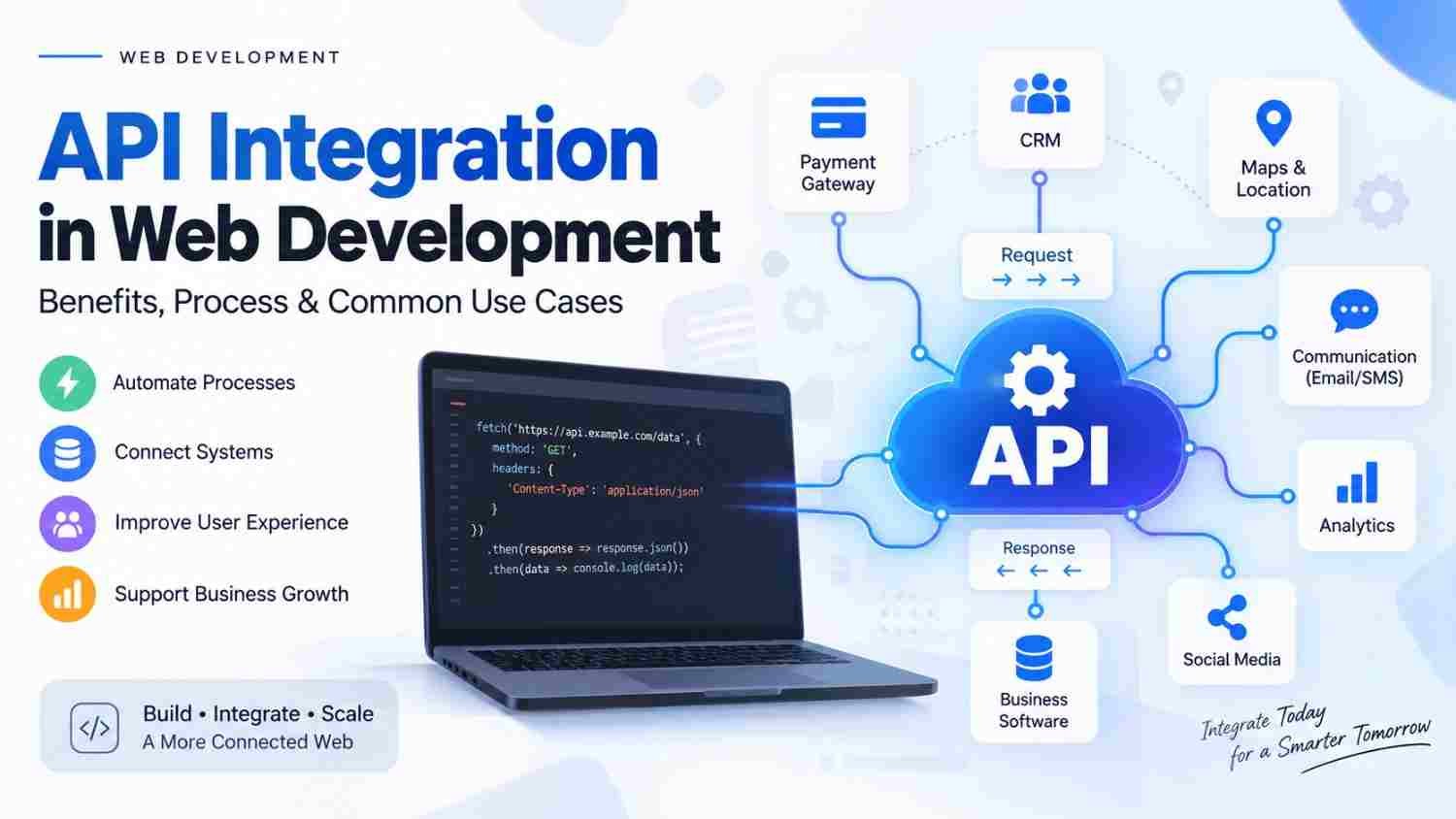
API Integration in Web Development connects a website or web application with another software system, service, or platform so that they can exchange data and perform actions. For example, APIs can connect websites with payment gateways, CRM systems, maps, communication platforms, analytics tools, or other business software.
As a result, businesses can automate processes, reduce manual data entry, and create connected digital experiences without building every function from scratch.
API integration in web development is the process of connecting a web application with external or internal software through an Application Programming Interface (API). The API defines how systems can communicate, what information can be requested or sent, and how the receiving system responds.
For example, an e-commerce website can use an API to communicate with a payment service, while a CRM integration can send new customer information from a website directly into a sales system.
Therefore, API integration is an important part of modern web development when different systems need to work together efficiently.
APIs allow different software systems to communicate with each other.
API integration can connect websites with payments, CRM, maps, communication, analytics, and other services.
It can reduce repetitive manual work and improve data flow.
REST APIs are commonly used for web-based communication, although other API styles also exist.
A successful integration requires proper planning, authentication, error handling, testing, and monitoring.
API security should be considered throughout development.
Businesses should select integrations according to their actual requirements rather than adding unnecessary third-party services.
An API, or Application Programming Interface, provides a defined way for software components to communicate and exchange information.
In simple terms, think of an API as a connection between two systems.
For example:
Website → API → Payment Service
A customer places an order on the website. The website sends the required information to the payment service through its API. The payment service processes the request and sends a response back.
Similarly:
Website → API → CRM
When a visitor submits a lead form, the website can send the lead information to a CRM through an API. The sales team can then manage that lead inside the CRM.
MDN explains that APIs provide ways for developers to use functionality and communicate with services without needing to implement all of that underlying functionality themselves.
Although the technical implementation can vary, an API interaction generally involves a request and response.
The website or application sends a request to an API endpoint.
The request may contain:
URL or endpoint
HTTP method
Headers
Authentication information
Parameters
Request body, where required
The receiving system checks the request and performs the requested operation.
For example, it might retrieve customer information or create a payment request.
The API then returns a response.
The response may contain:
Requested data
Confirmation
Error information
Status code
Other relevant information
HTTP provides the communication framework used by many web APIs. MDN describes HTTP as a client-server protocol in which clients send requests and servers return responses.
Different projects can require different API approaches. The right option depends on the systems involved and the application's requirements.
REST APIs commonly use HTTP methods such as GET, POST, PUT, and DELETE to work with resources.
For example:
GET can retrieve information.
POST can submit or create information.
PUT can update information.
DELETE can remove information.
HTTP methods have specific semantics, so developers should use them according to the intended operation.
SOAP is a protocol-based approach that has historically been used in many enterprise and business systems.
It may still be relevant when an existing service requires SOAP communication.
GraphQL allows clients to request the data they need through a defined query structure.
It can be useful when applications require more flexible data retrieval.
Webhooks work differently from a typical request-response integration.
Instead of repeatedly asking another system whether something has changed, a service can send an HTTP request to a specified endpoint when a particular event occurs.
For example, a payment service may send a notification to an application after a transaction status changes.
API integration can provide several practical benefits for businesses.
Businesses often use multiple platforms for different functions.
For example, a company may use separate systems for:
Customer management
Payments
Accounting
Marketing
Communication
Analytics
API integration can help these systems exchange relevant information.
Without integration, employees may need to manually copy information from one platform to another.
An API can automate that data transfer when the systems support the required functionality.
Connected systems can exchange information more efficiently.
For example, an ecommerce order can trigger information flow to other connected systems instead of requiring employees to enter the same information repeatedly.
API integrations can allow users to access useful functionality without leaving the main application.
For instance, a website can provide payment, location, login, or communication features through integrated services.
Businesses do not always need to build every feature themselves.
When a reliable third-party service provides the required functionality through an API, developers can integrate it into the application instead.
As a business adds new tools and services, integrations can help connect those systems with its existing digital infrastructure.
However, every integration should be evaluated carefully because unnecessary dependencies can increase technical complexity.
API integrations are used across many types of websites and web applications.
An ecommerce website can integrate a payment gateway so customers can complete online transactions.
The API can help the website communicate with the payment service and receive transaction-related responses.
A lead-generation website can send form submissions directly to a CRM.
This can help sales teams organize and follow up with leads without manually transferring every submission.
Businesses can integrate mapping services into websites and applications for functions such as:
Location display
Directions
Address searches
Store locators
Delivery-related functionality
APIs can connect applications with supported social platforms for specific functionality such as authentication, sharing, or retrieving permitted information.
The exact capabilities depend on the platform's current API policies and permissions.
Web applications can connect with supported email, SMS, notification, or communication services.
For example, an application may trigger a notification after a user submits a form or completes an action.
Businesses can integrate analytics services to collect and analyze information about website or application activity.
An application can potentially exchange relevant information with accounting, inventory, ERP, or other business systems when those platforms provide suitable APIs.
A structured process can make API integration easier to manage.
First, determine what needs to be connected and why.
For example:
“When a customer submits the website form, create a new lead in our CRM.”
This is much more useful than simply deciding to “add an API.”
Next, identify the service that provides the required functionality.
Review:
Documentation
Available endpoints
Authentication methods
Data requirements
Rate limits
Pricing or usage restrictions
Error responses
Support
Versioning
Developers need to understand how the API expects requests to be structured.
Good documentation should explain available endpoints, parameters, authentication, responses, and error handling.
Many APIs require authentication before allowing access.
Depending on the service, this can involve API keys, tokens, OAuth, or another authentication mechanism.
Credentials should be handled securely and should not be unnecessarily exposed in client-side code.
Developers then connect the web application with the API.
This includes sending appropriate requests, processing responses, handling errors, and connecting the returned data with the application's workflow.
Testing should cover both successful and unsuccessful scenarios.
For example:
Valid requests
Invalid data
Authentication failures
API downtime
Slow responses
Unexpected responses
Duplicate requests
Rate-limit responses
API integration doesn't necessarily end after launch.
Third-party services can change their documentation, endpoints, authentication requirements, limits, or versions.
Therefore, integrations should be monitored and maintained over time.
Security should be considered from the beginning rather than added after development.
Important practices include:
Use the authentication mechanism recommended by the API provider and protect credentials appropriately.
Sensitive information should be transmitted through secure connections.
Applications should ensure that users can only access information and actions they are authorized to use.
Incoming and outgoing data should be validated according to the application's requirements.
Error messages should provide enough information for troubleshooting without unnecessarily exposing sensitive technical details.
Applications may need protections against excessive requests, depending on the API and use case.
OWASP maintains an API Security Top 10 covering risks such as broken authorization, broken authentication, unrestricted resource consumption, security misconfiguration, improper API inventory management, and unsafe consumption of APIs.
Therefore, API security should be part of the development and testing process rather than an afterthought.
Even when an API is technically easy to connect, poor implementation can create problems.
A service may look suitable initially but lack the endpoints or permissions your application actually needs.
Sensitive credentials should not be placed where unauthorized users can easily access them.
An API can fail, become unavailable, return invalid data, or reject a request.
The application should be prepared for these situations.
Testing only the successful scenario is not enough.
Developers should also test invalid requests, expired authentication, timeouts, unavailable services, and other expected failure conditions.
Third-party APIs can evolve.
Therefore, developers should monitor documentation and version changes that could affect the integration.
More integrations do not automatically mean a better application.
Each additional dependency can introduce maintenance, security, and reliability considerations.
API integration can be useful when your website or web application needs to communicate with another system.
You may need an integration if you want to:
Connect a payment gateway
Send website leads to a CRM
Display location information
Connect accounting software
Synchronize inventory
Automate notifications
Connect an ERP system
Exchange information with another application
Add third-party functionality to an existing web application
However, if your website only provides basic company information and does not need to communicate with another system, complex API integration may not be necessary.
There is no single fixed cost for API integration because every integration has different technical requirements.
The overall development effort can depend on:
API complexity
Number of endpoints
Authentication requirements
Data transformation
Number of systems being connected
Custom business logic
Testing requirements
Security requirements
Documentation quality
Third-party limitations
Ongoing maintenance
For example, connecting a simple form to one external service can be considerably different from synchronizing data between multiple business systems.
Therefore, businesses should first define the integration requirements before estimating the development scope.
If your project requires professional API integration, don't select a development company based only on a low quotation.
Instead, consider the following:
Ask whether the development team has worked with APIs and systems similar to yours.
The team should understand the API documentation before development begins.
Ask how authentication, credentials, access control, and sensitive information will be handled.
Find out how the team handles API failures, invalid responses, timeouts, and other edge cases.
Third-party APIs can change. Therefore, ask how future updates and maintenance will be handled.
Clear communication is particularly important when multiple systems and third-party providers are involved.
For businesses looking for broader web development support, you can explore Tulyarth DigiWeb's web application development services to understand its development capabilities and available solutions.
You can also check about Tulyarth DigiWeb and its wider digital services before discussing a project.
If you have a specific API integration requirement, contact Tulyarth DigiWeb to discuss your project and understand the development approach for your business needs.
Businesses sometimes need to decide whether to integrate an existing service or build a similar feature themselves.
Neither option is automatically better.
The right choice depends on the required functionality, control, budget, technical complexity, security requirements, and long-term business plans.
API Integration in Web Development allows different applications and services to communicate, exchange information, and work together.
From payment gateways and CRM systems to analytics, maps, communication tools, and business software, APIs can extend what a website or web application is capable of doing.
However, successful integration is about more than simply connecting two systems. Requirement planning, API selection, authentication, development, testing, security, error handling, and ongoing maintenance all matter.
Therefore, businesses should first identify the workflow they want to improve and then select an API and integration approach that fits their technical and business requirements.
When planned correctly, API integration can help create more connected, automated, and scalable web applications.
API Integration in Web Development: Benefits, Process & Common Use Cases
Web Application Development in Dehradun: Services, Process & Benefits
Ecommerce Website Development in Dehradun: Complete Guide for Businesses
How to Choose a Digital Marketing Company in Dehradun: Complete Guide
Social Media Marketing Company in Dehradun: Services, Benefits & How to Choose