Google Search Console Now Displays Social Platform Performance: Complete Guide
- Home
- Google Search Console Now Displays Social Platform Performance: Complete Guide
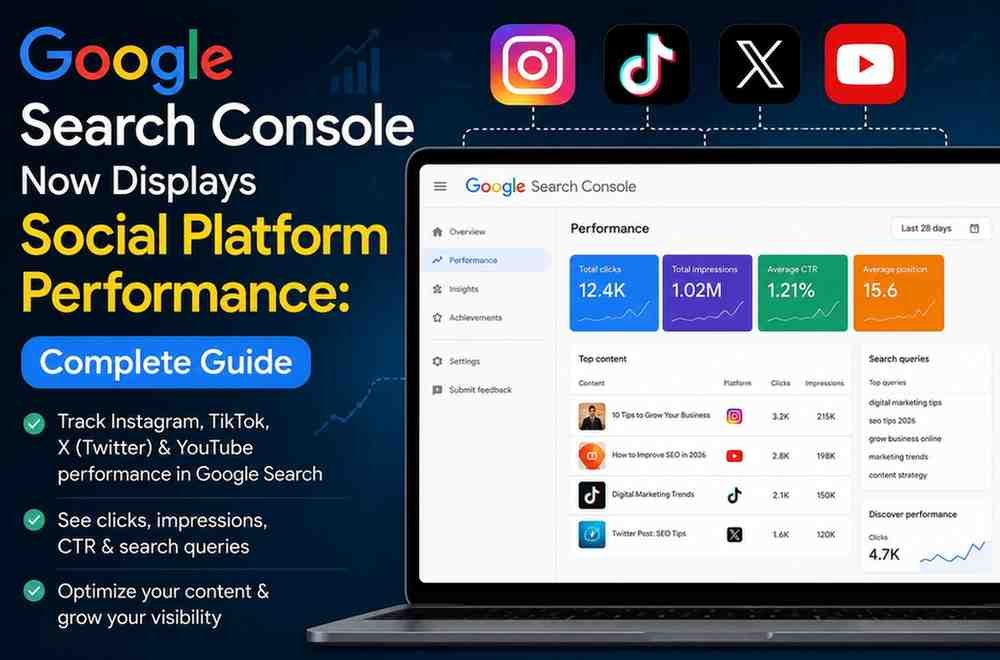
Google just rolled out a massive update that changes how you track organic visibility. You can now see exactly how your social media posts perform inside Google Search and Discover. The new Google Search Console social platform performance feature allows you to connect your Instagram, TikTok, X, and YouTube accounts directly to your analytics dashboard. This means you no longer have to guess which search terms lead people to your social videos and posts.
Before this update, tracking how your social content performed on Google was nearly impossible. You could see your website traffic, but your social media analytics only showed what happened inside those specific apps. Now, Google bridges that gap completely. If you want to claim your authority online, understanding this tracking tool is essential for your brand strategy.
What is the new Google Search Console update?
Google introduced platform properties to track how your social and video posts perform on Google Search and Discover. It supports Instagram, TikTok, X (formerly Twitter), and YouTube.
Why does this matter for your business?
You can now view clicks, impressions, and exact search queries for individual social posts. This allows you to optimize your social captions for search engines and capture traffic outside your main website.
Google calls this new feature platform properties. It is a completely new property type built specifically for social media accounts rather than traditional website domains. When you add a platform property, Google creates an independent dashboard for that specific social channel.
This is part of the massive Google Search Console update 2026 rollout designed to reflect how modern audiences discover content. People do not just click on blog posts anymore. They click on TikTok videos, Instagram Reels, and YouTube Shorts directly from the Google search results page.
It is important to understand that this integration is purely an analytics layer for creators and brands. This is different from the public-facing Search profiles that Google released recently. Platform properties are private dashboards meant to help you analyze data and refine your content strategy.
The new Google Search Console new features include three distinct reporting areas for each social account you connect. These reports mirror the classic layout of standard website analytics, which makes them very easy to navigate.
The core Google Search Console social performance report tracks total clicks, total impressions, average click-through rate, and average position. You can filter this data to see exactly which individual posts drive the most traffic. Most importantly, you can view the specific keywords people type into Google to find your social posts.
The Google Search Console social media reports include an Insights section that gives you a high-level overview of your data. It shows your recent traffic trends over a default 28-day window. It highlights your top-performing posts and tells you the main ways users discover your social profile across Google.
To keep creators motivated, Google added an Achievements tab. This section tracks your growth milestones. For example, it will celebrate when your Instagram or YouTube account hits a new threshold for total clicks coming from Google Search within a month.
Setting up your Google Search Console social media integration is a straightforward process. You do not need to alter any code on your social profiles. You simply need to verify your ownership through secure authorization.
[ Property Selector ] -> Click "Add Property"
( ) Instagram ( ) TikTok ( ) X ( ) YouTube
Log in to social account & grant GSC read-only access
Data begins populating within a few days (28-day view)
Open your dashboard at search.google.com and click the property selector drop-down menu in the left sidebar.
Click Add property at the bottom of the list.
Choose the specific social network you want to link from the new platform options.
Follow the secure on-screen prompts to log into your social account and authorize Google to read your performance data.
Once verified, click Go to property to view your new dashboard.
You must repeat this process independently for every social platform you want to track. Keep in mind that Google does not backfill data. Your tracking history starts the exact day you verify the connection. It usually takes a few days for the first set of numbers to populate.
It is vital to know what this feature does and what it does not do. Google is not tracking how many people view your videos inside the TikTok or Instagram apps. It only tracks how your content performs when it surfaces on Google.
This Google Search Console analytics expansion changes how we approach search engine optimization. In the past, social media marketing and SEO lived in separate bubbles. This update forces them to blend together.
When you optimize your social posts, you build a stronger presence online. A single brand can now own multiple spots on a single search results page. Your website might rank first, your YouTube video might rank second, and your TikTok might show up in a video carousel. This strategy helps you dominate your niche.
You can use Google Search Console SEO updates to find content gaps. Look for search terms that bring lots of impressions to your social channels but zero traffic to your website. This tells you exactly what topics you need to write about on your main blog.
You can also reverse engineer your top social posts. If an Instagram post gets thousands of clicks from Google Search, you should write an in-depth article on that exact topic for your website.
Google values Experience, Expertise, Authoritativeness, and Trustworthiness. Showing up consistently across search pages and social properties signals to Google that you are a trusted leader. It proves that real people interact with your brand across the entire internet.
Now that you can measure your Google Search Console social posts, you must optimize them to rank. You cannot rely on vague captions or random hashtags anymore.
Use Clear Titles: Write descriptive titles for your videos and posts. Include your target keywords naturally near the beginning of your text.
Write Detailed Captions: Treat your social media captions like mini blog posts. Provide helpful context that search engine bots can easily read and index.
Leverage Video Transcripts: Google crawls video audio and closed captions. Say your main keywords clearly in the first thirty seconds of your videos.
Keep Profiles Consistent: Use the exact same business name, logo, and description across all your platforms to help Google connect the dots.
If you want to integrate these new insights into your broader business growth plan, our team can help you build a cohesive search strategy. Explore our About Us page to see how we help brands scale, or head to our Contact Us page to schedule a strategic consultation.